> ## Documentation Index
> Fetch the complete documentation index at: https://docs.onestack.cloud/llms.txt
> Use this file to discover all available pages before exploring further.
# Manage users, roles, and permissions
> Keeping your workspace organized and secure is essential for smooth project management. Plane makes it easy to control who can access your workspace, what they can do, and how they collaborate with others. This guide will walk you through managing members, assigning roles, and understanding the permissions associated with each role.
## Roles[](#roles "Direct link to Roles")
Each user in your workspace has a role, which defines their level of access and permissions. Here’s a quick overview of the available roles:
* **Admin** Admins have full access to everything in the workspace. They can manage members, update settings, and perform all actions across projects, cycles, and modules. If you're an admin, you’re essentially running the show.
* **Member** Members are your core team. They can create, edit, and delete content in projects, cycles, and modules. Members also can create new projects. This role works well for collaborators who need to contribute to day-to-day tasks.
* **Guest** Guests are external collaborators—like clients or contractors—who need limited access. They can only view the specific content they’ve been invited to. This role is perfect for keeping outsiders in the loop without giving them full access.
### Grant view access to Guests[](#grant-view-access-to-guests "Direct link to Grant view access to Guests")
You can turn on this setting in **Project Settings > Members**. Enabling this setting allows guest users to view all project work items, providing them with broader visibility into the project's progress and details. This is useful for external stakeholders who need full context without editing permissions.  ## Permissions[](#permissions "Direct link to Permissions")
Permissions define what actions users can take within a workspace or project. By assigning appropriate roles, you can ensure everyone has the right level of access to collaborate effectively while maintaining security.
| Permission | Admin | Member | Guest |
| ------------------------- | :---: | :----: | :---: |
| Access Workspace settings | ✓ | x | x |
| Create Workspace | ✓ | x | x |
| Update Workspace | ✓ | x | x |
| Delete Workspace | ✓ | x | x |
| Add user | ✓ | x | x |
| Remove user | ✓ | x | x |
| Change user role | ✓ | x | x |
| Manage Project states | ✓ | x | x |
| Manage Billing and plans | ✓ | x | x |
| Manage Integrations | ✓ | x | x |
| Manage Imports | ✓ | x | x |
| Manage Exports | ✓ | x | x |
| Manage Webhooks | ✓ | x | x |
| Manage API tokens | ✓ | x | x |
| Manage Worklogs | ✓ | x | x |
| Home | ✓ | ✓ | ✓ |
| Your work | ✓ | ✓ | x |
| Inbox | ✓ | ✓ | ✓ |
| Drafts | ✓ | ✓ | x |
| Projects | ✓ | ✓ | x |
| View private projects | ✓ | x | x |
| View public projects | ✓ | ✓ | x |
| Join private projects | ✓ | x | x |
| Join public projects | ✓ | ✓ | x |
| Cycles | ✓ | ✓ | x |
| Views | ✓ | ✓ | ✓ |
| Analytics | ✓ | ✓ | x |
| Your favourites | ✓ | ✓ | x |
| Permission | Workspace Admin | Project Admin | Member | Guest |
| -------------------------------------------- | :-------------: | :-----------: | :----: | :---: |
| Access Project settings | ✓ | ✓ | x | x |
| Create Project | ✓ | ✓ | ✓ | x |
| Update Project | ✓ | ✓ | x | x |
| Archive Project | ✓ | ✓ | x | x |
| Delete Project | ✓ | ✓ | x | x |
| Add user | ✓ | ✓ | x | x |
| Remove user | ✓ | ✓ | x | x |
| Change user role | ✓ | ✓ | x | x |
| Enable features | ✓ | ✓ | x | x |
| Manage work item states | ✓ | ✓ | x | x |
| Manage work item labels | ✓ | ✓ | x | x |
| Manage Estimates | ✓ | ✓ | x | x |
| Manage Automations | ✓ | ✓ | x | x |
| Manage work item types and custom properties | ✓ | ✓ | x | x |
| Add Project to favorites | ✓ | ✓ | ✓ | x |
| Publish Project | ✓ | ✓ | x | x |
| Copy link | ✓ | ✓ | ✓ | x |
| View Archived projects | ✓ | ✓ | ✓ | x |
| Permission | Workspace Admin | Project Admin | Member | Guest | Guest with view access | Comments |
| ------------------------- | :-------------: | :-----------: | :----: | :---: | :--------------------: | ------------------------------------------------------------------------------------- |
| Create Work item | ✓ | ✓ | ✓ | x | x | |
| View Work items | ✓ | ✓ | ✓ | x | ✓ | Guests without view access can only see their own work items accepted through Intake. |
| Edit Work item | ✓ | ✓ | ✓ | x | x | |
| Duplicate Work item | ✓ | ✓ | ✓ | x | x | |
| Copy link | ✓ | ✓ | ✓ | x | x | |
| Archive Work item | ✓ | ✓ | ✓ | x | x | |
| Delete Work item | ✓ | ✓ | ✓ | x | x | |
| Edit Work item properties | ✓ | ✓ | ✓ | x | x | |
| View Work item activity | ✓ | ✓ | ✓ | x | ✓ | |
| Log work | ✓ | ✓ | ✓ | x | x | |
| Add Comments | ✓ | ✓ | ✓ | x | ✓ | |
| View Comments | ✓ | ✓ | ✓ | x | ✓ | |
| Add Reactions | ✓ | ✓ | ✓ | x | ✓ | |
| View work item types | ✓ | ✓ | ✓ | ✓ | ✓ | |
| Use work item types | ✓ | ✓ | ✓ | x | x | |
| Permission | Workspace Admin | Project Admin | Member | Guest |
| ---------------------- | :-------------: | :-----------: | :----: | :---: |
| Create Cycle | ✓ | ✓ | ✓ | x |
| View Cycles | ✓ | ✓ | ✓ | x |
| View Cycle work items | ✓ | ✓ | ✓ | x |
| Edit Cycle | ✓ | ✓ | ✓ | x |
| Add work items | ✓ | ✓ | ✓ | x |
| Archive Cycle | ✓ | ✓ | ✓ | x |
| Delete Cycle | ✓ | ✓ | ✓ | x |
| Copy link | ✓ | ✓ | ✓ | x |
| Add Cycle to favorites | ✓ | ✓ | ✓ | x |
| View Cycle details | ✓ | ✓ | ✓ | x |
| Filter Cycles | ✓ | ✓ | ✓ | x |
| Search Cycles | ✓ | ✓ | ✓ | x |
| Permission | Workspace Admin | Project Admin | Member | Guest |
| ----------------------- | :-------------: | :-----------: | :----: | :---: |
| Create Module | ✓ | ✓ | ✓ | x |
| View Modules | ✓ | ✓ | ✓ | x |
| View Module work items | ✓ | ✓ | ✓ | x |
| Edit Module | ✓ | ✓ | ✓ | x |
| Add work items | ✓ | ✓ | ✓ | x |
| Archive Module | ✓ | ✓ | ✓ | x |
| Delete Module | ✓ | ✓ | ✓ | x |
| Copy link | ✓ | ✓ | ✓ | x |
| Add Module to favorites | ✓ | ✓ | ✓ | x |
| View Module details | ✓ | ✓ | ✓ | x |
| Add links to Module | ✓ | ✓ | ✓ | x |
| Sort Modules | ✓ | ✓ | ✓ | x |
| Filter Modules | ✓ | ✓ | ✓ | x |
| Search Modules | ✓ | ✓ | ✓ | x |
| Permission | Workspace Admin | Project Admin | Member | Guest | Guest with view access | Comments |
| --------------------- | :-------------: | :-----------: | :----: | :---: | :--------------------: | ------------------------------------------------------------- |
| Create View | ✓ | ✓ | ✓ | ✓ | ✓ | |
| See Views | ✓ | ✓ | ✓ | x | ✓ | Guests without view access can only see the Views they create |
| Edit View | ✓ | ✓ | ✓ | x | ✓ | |
| Add work items | ✓ | ✓ | ✓ | x | x | |
| Delete View | ✓ | ✓ | ✓ | x | ✓ | |
| Sort Views | ✓ | ✓ | ✓ | x | ✓ | |
| Filter Views | ✓ | ✓ | ✓ | x | ✓ | |
| Search Views | ✓ | ✓ | ✓ | x | ✓ | |
| Add View to favorites | ✓ | ✓ | ✓ | x | x | |
| Publish View | ✓ | ✓ | ✓ | x | x | |
| Copy link | ✓ | ✓ | ✓ | x | x | |
| Permission | Workspace Admin | Project Admin | Member | Guest | Guest with view access |
| --------------------- | :-------------: | :-----------: | :----: | :---: | :--------------------: |
| Create Page | ✓ | ✓ | ✓ | x | x |
| View Pages | ✓ | ✓ | ✓ | x | ✓ |
| Edit Page | ✓ | ✓ | ✓ | x | x |
| Archive Page | ✓ | ✓ | ✓ | x | x |
| Delete Page | ✓ | ✓ | ✓ | x | x |
| Add Page to favorites | ✓ | ✓ | ✓ | x | x |
| Publish Page | ✓ | ✓ | ✓ | x | x |
| Copy link | ✓ | ✓ | ✓ | x | x |
| Sort Pages | ✓ | ✓ | ✓ | x | ✓ |
| Filter Pages | ✓ | ✓ | ✓ | x | ✓ |
| Search Pages | ✓ | ✓ | ✓ | x | ✓ |
| Permission | Workspace Admin | Project Admin | Member | Guest | Guest with view access | Comments |
| ---------------------------------- | :-------------: | :-----------: | :----: | :---: | :--------------------: | ----------------------------------------------------------------------------- |
| Create Intake work item | ✓ | ✓ | ✓ | ✓ | ✓ | |
| View Intake work items | ✓ | ✓ | ✓ | ✓ | ✓ | Guest without view access can only view the Intake work items they create |
| Edit Intake work item | ✓ | ✓ | x | ✓ | x | Guest without view access can only modify the Intake work items they create |
| Accept Intake work item | ✓ | ✓ | x | x | x | |
| Reject Intake work item | ✓ | ✓ | x | x | x | |
| Snooze Intake work item | ✓ | ✓ | ✓ | x | x | Members can't snooze work items created by other users |
| Mark duplicate | ✓ | ✓ | ✓ | x | x | Members can't mark duplicate Intake work items created by other users |
| Delete Intake work item | ✓ | ✓ | ✓ | x | x | Members can't delete Intake work items created by other users |
| Add attachments | ✓ | ✓ | ✓ | ✓ | ✓ | Members and Guests can only attach files to the Intake work items they create |
| Modify Intake work item properties | ✓ | ✓ | ✓ | ✓ | ✓ | Members and Guests can only modify Intake work item properties they create |
| View activity | ✓ | ✓ | ✓ | x | ✓ | |
| Add comments | ✓ | ✓ | ✓ | x | ✓ | |
| Add reactions | ✓ | ✓ | ✓ | x | ✓ | |
| Copy link | ✓ | ✓ | ✓ | x | ✓ | |
| Sort Intake work items | ✓ | ✓ | ✓ | ✓ | ✓ | |
| Filter Intake work items | ✓ | ✓ | ✓ | ✓ | ✓ | |
## Manage Members[](#manage-members "Direct link to Manage Members")
You can manage the members in your workspace by navigating to **Workspace settings > Members**.
### Add member[](#add-member "Direct link to Add member")
## Permissions[](#permissions "Direct link to Permissions")
Permissions define what actions users can take within a workspace or project. By assigning appropriate roles, you can ensure everyone has the right level of access to collaborate effectively while maintaining security.
| Permission | Admin | Member | Guest |
| ------------------------- | :---: | :----: | :---: |
| Access Workspace settings | ✓ | x | x |
| Create Workspace | ✓ | x | x |
| Update Workspace | ✓ | x | x |
| Delete Workspace | ✓ | x | x |
| Add user | ✓ | x | x |
| Remove user | ✓ | x | x |
| Change user role | ✓ | x | x |
| Manage Project states | ✓ | x | x |
| Manage Billing and plans | ✓ | x | x |
| Manage Integrations | ✓ | x | x |
| Manage Imports | ✓ | x | x |
| Manage Exports | ✓ | x | x |
| Manage Webhooks | ✓ | x | x |
| Manage API tokens | ✓ | x | x |
| Manage Worklogs | ✓ | x | x |
| Home | ✓ | ✓ | ✓ |
| Your work | ✓ | ✓ | x |
| Inbox | ✓ | ✓ | ✓ |
| Drafts | ✓ | ✓ | x |
| Projects | ✓ | ✓ | x |
| View private projects | ✓ | x | x |
| View public projects | ✓ | ✓ | x |
| Join private projects | ✓ | x | x |
| Join public projects | ✓ | ✓ | x |
| Cycles | ✓ | ✓ | x |
| Views | ✓ | ✓ | ✓ |
| Analytics | ✓ | ✓ | x |
| Your favourites | ✓ | ✓ | x |
| Permission | Workspace Admin | Project Admin | Member | Guest |
| -------------------------------------------- | :-------------: | :-----------: | :----: | :---: |
| Access Project settings | ✓ | ✓ | x | x |
| Create Project | ✓ | ✓ | ✓ | x |
| Update Project | ✓ | ✓ | x | x |
| Archive Project | ✓ | ✓ | x | x |
| Delete Project | ✓ | ✓ | x | x |
| Add user | ✓ | ✓ | x | x |
| Remove user | ✓ | ✓ | x | x |
| Change user role | ✓ | ✓ | x | x |
| Enable features | ✓ | ✓ | x | x |
| Manage work item states | ✓ | ✓ | x | x |
| Manage work item labels | ✓ | ✓ | x | x |
| Manage Estimates | ✓ | ✓ | x | x |
| Manage Automations | ✓ | ✓ | x | x |
| Manage work item types and custom properties | ✓ | ✓ | x | x |
| Add Project to favorites | ✓ | ✓ | ✓ | x |
| Publish Project | ✓ | ✓ | x | x |
| Copy link | ✓ | ✓ | ✓ | x |
| View Archived projects | ✓ | ✓ | ✓ | x |
| Permission | Workspace Admin | Project Admin | Member | Guest | Guest with view access | Comments |
| ------------------------- | :-------------: | :-----------: | :----: | :---: | :--------------------: | ------------------------------------------------------------------------------------- |
| Create Work item | ✓ | ✓ | ✓ | x | x | |
| View Work items | ✓ | ✓ | ✓ | x | ✓ | Guests without view access can only see their own work items accepted through Intake. |
| Edit Work item | ✓ | ✓ | ✓ | x | x | |
| Duplicate Work item | ✓ | ✓ | ✓ | x | x | |
| Copy link | ✓ | ✓ | ✓ | x | x | |
| Archive Work item | ✓ | ✓ | ✓ | x | x | |
| Delete Work item | ✓ | ✓ | ✓ | x | x | |
| Edit Work item properties | ✓ | ✓ | ✓ | x | x | |
| View Work item activity | ✓ | ✓ | ✓ | x | ✓ | |
| Log work | ✓ | ✓ | ✓ | x | x | |
| Add Comments | ✓ | ✓ | ✓ | x | ✓ | |
| View Comments | ✓ | ✓ | ✓ | x | ✓ | |
| Add Reactions | ✓ | ✓ | ✓ | x | ✓ | |
| View work item types | ✓ | ✓ | ✓ | ✓ | ✓ | |
| Use work item types | ✓ | ✓ | ✓ | x | x | |
| Permission | Workspace Admin | Project Admin | Member | Guest |
| ---------------------- | :-------------: | :-----------: | :----: | :---: |
| Create Cycle | ✓ | ✓ | ✓ | x |
| View Cycles | ✓ | ✓ | ✓ | x |
| View Cycle work items | ✓ | ✓ | ✓ | x |
| Edit Cycle | ✓ | ✓ | ✓ | x |
| Add work items | ✓ | ✓ | ✓ | x |
| Archive Cycle | ✓ | ✓ | ✓ | x |
| Delete Cycle | ✓ | ✓ | ✓ | x |
| Copy link | ✓ | ✓ | ✓ | x |
| Add Cycle to favorites | ✓ | ✓ | ✓ | x |
| View Cycle details | ✓ | ✓ | ✓ | x |
| Filter Cycles | ✓ | ✓ | ✓ | x |
| Search Cycles | ✓ | ✓ | ✓ | x |
| Permission | Workspace Admin | Project Admin | Member | Guest |
| ----------------------- | :-------------: | :-----------: | :----: | :---: |
| Create Module | ✓ | ✓ | ✓ | x |
| View Modules | ✓ | ✓ | ✓ | x |
| View Module work items | ✓ | ✓ | ✓ | x |
| Edit Module | ✓ | ✓ | ✓ | x |
| Add work items | ✓ | ✓ | ✓ | x |
| Archive Module | ✓ | ✓ | ✓ | x |
| Delete Module | ✓ | ✓ | ✓ | x |
| Copy link | ✓ | ✓ | ✓ | x |
| Add Module to favorites | ✓ | ✓ | ✓ | x |
| View Module details | ✓ | ✓ | ✓ | x |
| Add links to Module | ✓ | ✓ | ✓ | x |
| Sort Modules | ✓ | ✓ | ✓ | x |
| Filter Modules | ✓ | ✓ | ✓ | x |
| Search Modules | ✓ | ✓ | ✓ | x |
| Permission | Workspace Admin | Project Admin | Member | Guest | Guest with view access | Comments |
| --------------------- | :-------------: | :-----------: | :----: | :---: | :--------------------: | ------------------------------------------------------------- |
| Create View | ✓ | ✓ | ✓ | ✓ | ✓ | |
| See Views | ✓ | ✓ | ✓ | x | ✓ | Guests without view access can only see the Views they create |
| Edit View | ✓ | ✓ | ✓ | x | ✓ | |
| Add work items | ✓ | ✓ | ✓ | x | x | |
| Delete View | ✓ | ✓ | ✓ | x | ✓ | |
| Sort Views | ✓ | ✓ | ✓ | x | ✓ | |
| Filter Views | ✓ | ✓ | ✓ | x | ✓ | |
| Search Views | ✓ | ✓ | ✓ | x | ✓ | |
| Add View to favorites | ✓ | ✓ | ✓ | x | x | |
| Publish View | ✓ | ✓ | ✓ | x | x | |
| Copy link | ✓ | ✓ | ✓ | x | x | |
| Permission | Workspace Admin | Project Admin | Member | Guest | Guest with view access |
| --------------------- | :-------------: | :-----------: | :----: | :---: | :--------------------: |
| Create Page | ✓ | ✓ | ✓ | x | x |
| View Pages | ✓ | ✓ | ✓ | x | ✓ |
| Edit Page | ✓ | ✓ | ✓ | x | x |
| Archive Page | ✓ | ✓ | ✓ | x | x |
| Delete Page | ✓ | ✓ | ✓ | x | x |
| Add Page to favorites | ✓ | ✓ | ✓ | x | x |
| Publish Page | ✓ | ✓ | ✓ | x | x |
| Copy link | ✓ | ✓ | ✓ | x | x |
| Sort Pages | ✓ | ✓ | ✓ | x | ✓ |
| Filter Pages | ✓ | ✓ | ✓ | x | ✓ |
| Search Pages | ✓ | ✓ | ✓ | x | ✓ |
| Permission | Workspace Admin | Project Admin | Member | Guest | Guest with view access | Comments |
| ---------------------------------- | :-------------: | :-----------: | :----: | :---: | :--------------------: | ----------------------------------------------------------------------------- |
| Create Intake work item | ✓ | ✓ | ✓ | ✓ | ✓ | |
| View Intake work items | ✓ | ✓ | ✓ | ✓ | ✓ | Guest without view access can only view the Intake work items they create |
| Edit Intake work item | ✓ | ✓ | x | ✓ | x | Guest without view access can only modify the Intake work items they create |
| Accept Intake work item | ✓ | ✓ | x | x | x | |
| Reject Intake work item | ✓ | ✓ | x | x | x | |
| Snooze Intake work item | ✓ | ✓ | ✓ | x | x | Members can't snooze work items created by other users |
| Mark duplicate | ✓ | ✓ | ✓ | x | x | Members can't mark duplicate Intake work items created by other users |
| Delete Intake work item | ✓ | ✓ | ✓ | x | x | Members can't delete Intake work items created by other users |
| Add attachments | ✓ | ✓ | ✓ | ✓ | ✓ | Members and Guests can only attach files to the Intake work items they create |
| Modify Intake work item properties | ✓ | ✓ | ✓ | ✓ | ✓ | Members and Guests can only modify Intake work item properties they create |
| View activity | ✓ | ✓ | ✓ | x | ✓ | |
| Add comments | ✓ | ✓ | ✓ | x | ✓ | |
| Add reactions | ✓ | ✓ | ✓ | x | ✓ | |
| Copy link | ✓ | ✓ | ✓ | x | ✓ | |
| Sort Intake work items | ✓ | ✓ | ✓ | ✓ | ✓ | |
| Filter Intake work items | ✓ | ✓ | ✓ | ✓ | ✓ | |
## Manage Members[](#manage-members "Direct link to Manage Members")
You can manage the members in your workspace by navigating to **Workspace settings > Members**.
### Add member[](#add-member "Direct link to Add member")
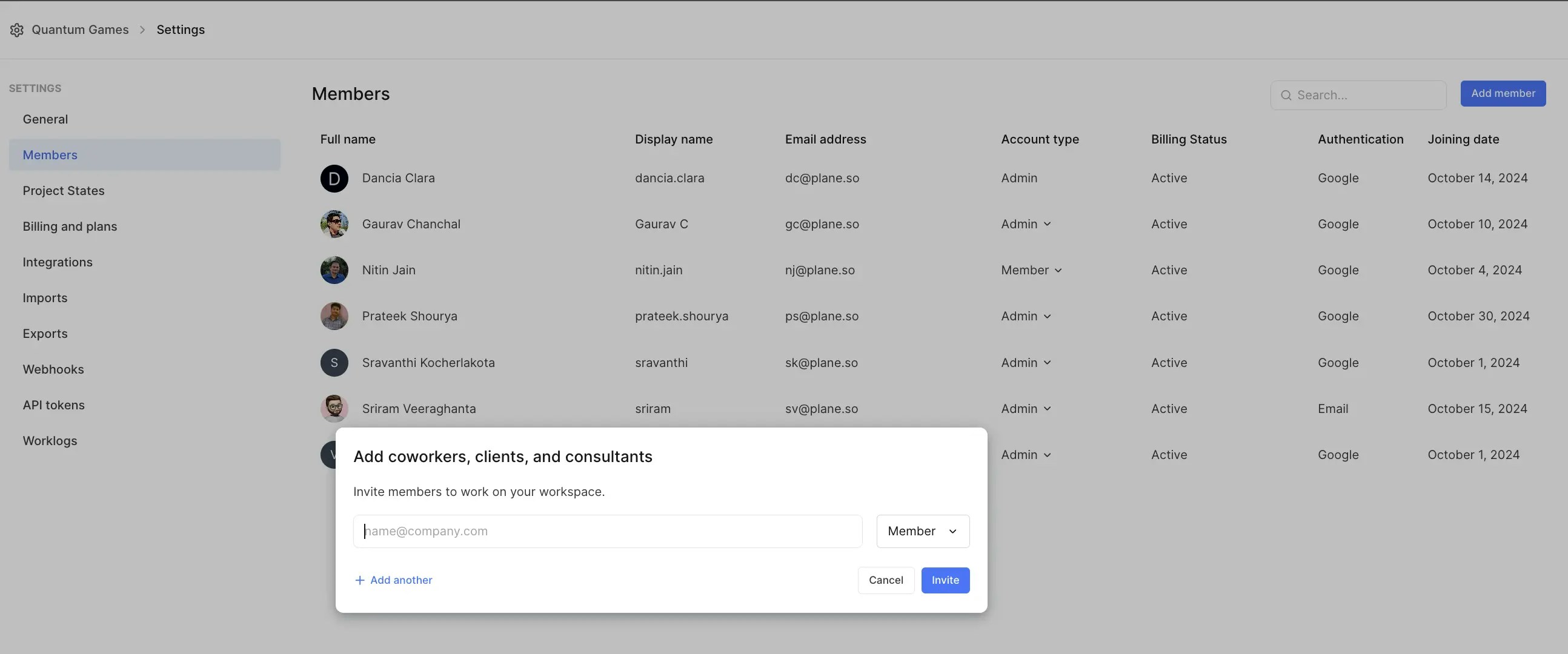 1. Click on **Add member**. This opens a modal where you can:
1. Enter the email addresses of the user you’re inviting.
2. Assign the role to **Admin**, **Member**, or **Guest**.
3. Click **Add another** to add multiple users.
4. Finally, click the **Invite** button.
Once invited, members receive an email notification.
Ensure your SMTP server is properly configured to send invite emails successfully. See [Email](https://developers.plane.so/self-hosting/govern/communication) for more information.
After the user accepts the invitation, they’ll be added to the workspace. If they don’t accept or decline, you can manually remove the pending invitation.
### Update member roles[](#update-member-roles "Direct link to Update member roles")
1. Click on **Add member**. This opens a modal where you can:
1. Enter the email addresses of the user you’re inviting.
2. Assign the role to **Admin**, **Member**, or **Guest**.
3. Click **Add another** to add multiple users.
4. Finally, click the **Invite** button.
Once invited, members receive an email notification.
Ensure your SMTP server is properly configured to send invite emails successfully. See [Email](https://developers.plane.so/self-hosting/govern/communication) for more information.
After the user accepts the invitation, they’ll be added to the workspace. If they don’t accept or decline, you can manually remove the pending invitation.
### Update member roles[](#update-member-roles "Direct link to Update member roles")
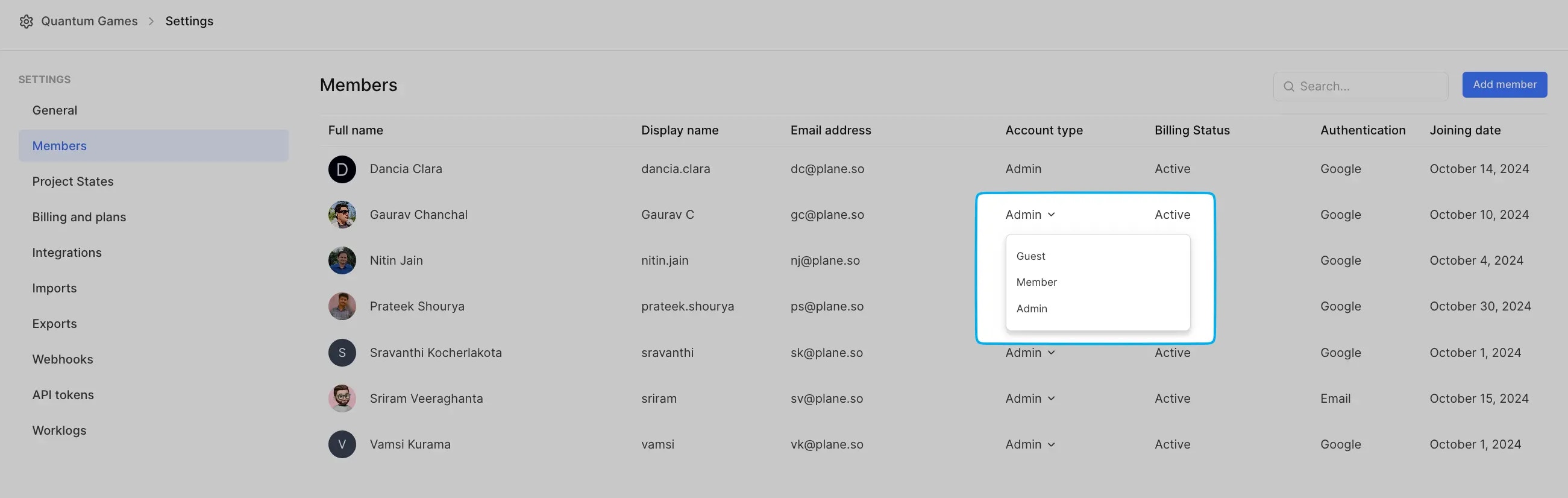 1. Locate the member whose role you want to update.
2. Use the role dropdown to promote or demote their role.
Admins can update any member's role, while regular members can only promote others to the Member role.
### Remove member[](#remove-member "Direct link to Remove member")
1. Locate the member whose role you want to update.
2. Use the role dropdown to promote or demote their role.
Admins can update any member's role, while regular members can only promote others to the Member role.
### Remove member[](#remove-member "Direct link to Remove member")
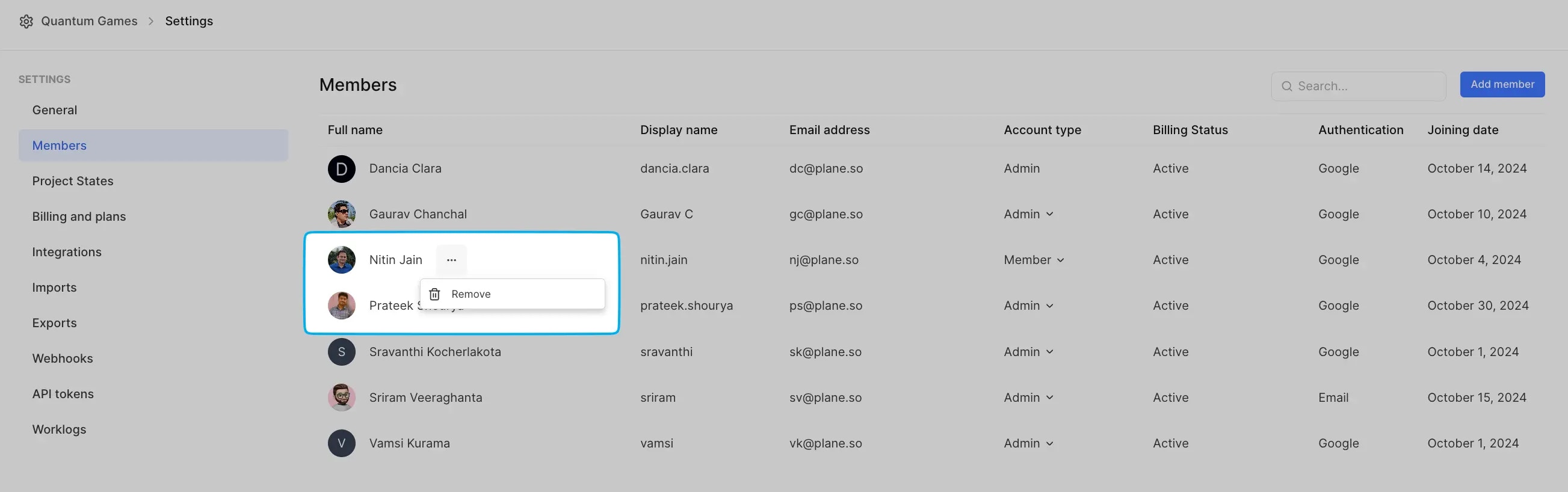 1. Find the member you want to remove.
2. Click the **Remove** option next to their name.
Once removed, they’ll immediately lose access to the workspace and its projects.
1. Find the member you want to remove.
2. Click the **Remove** option next to their name.
Once removed, they’ll immediately lose access to the workspace and its projects.