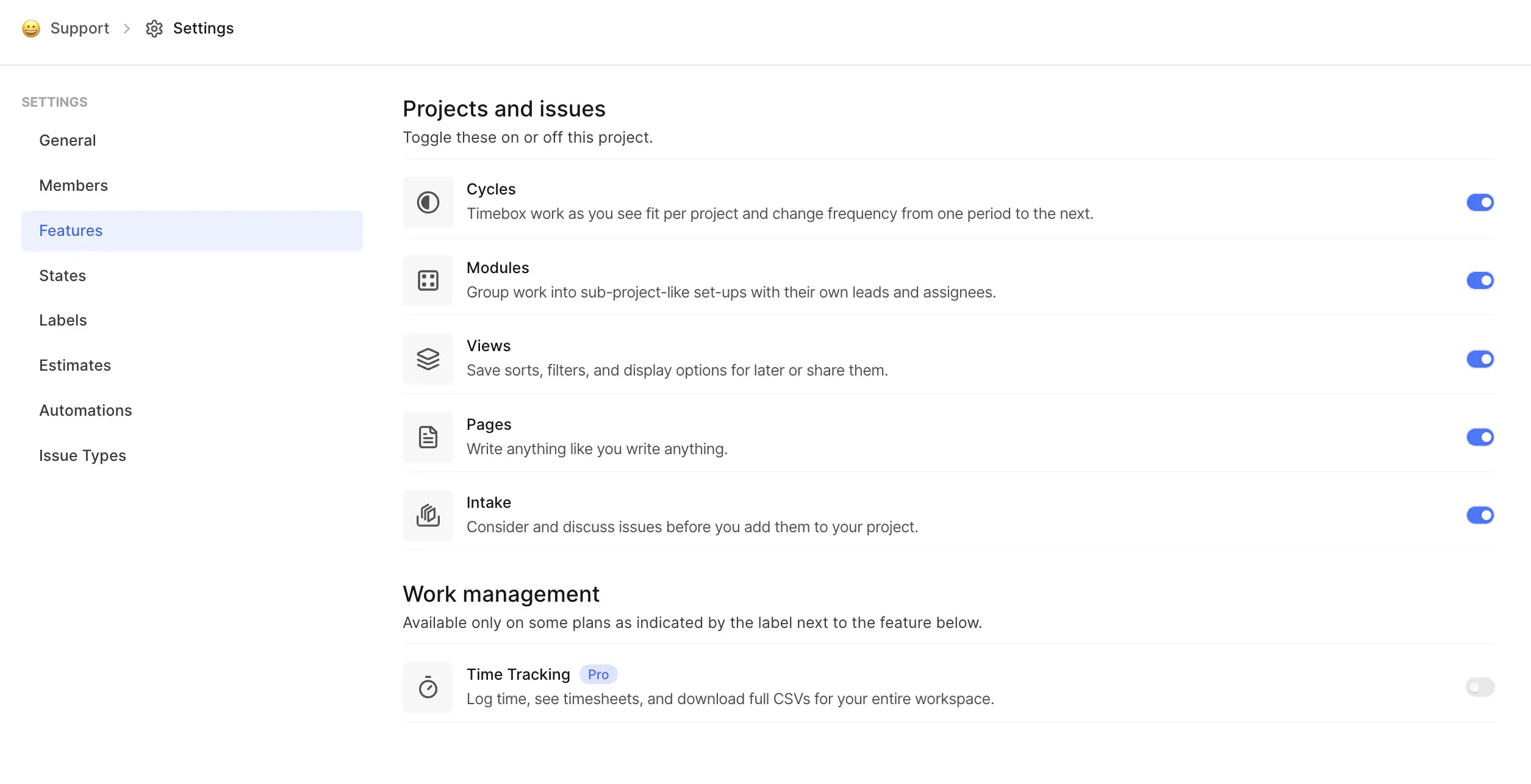
Projects let you manage your teams, tasks, and everything you need to get things done within your workspace. Once you’ve set up your , the next step is to create a Project. Each project acts as a container for your work, bringing together the work items, cycles, modules, and all the other tasks you and your team need to manage.
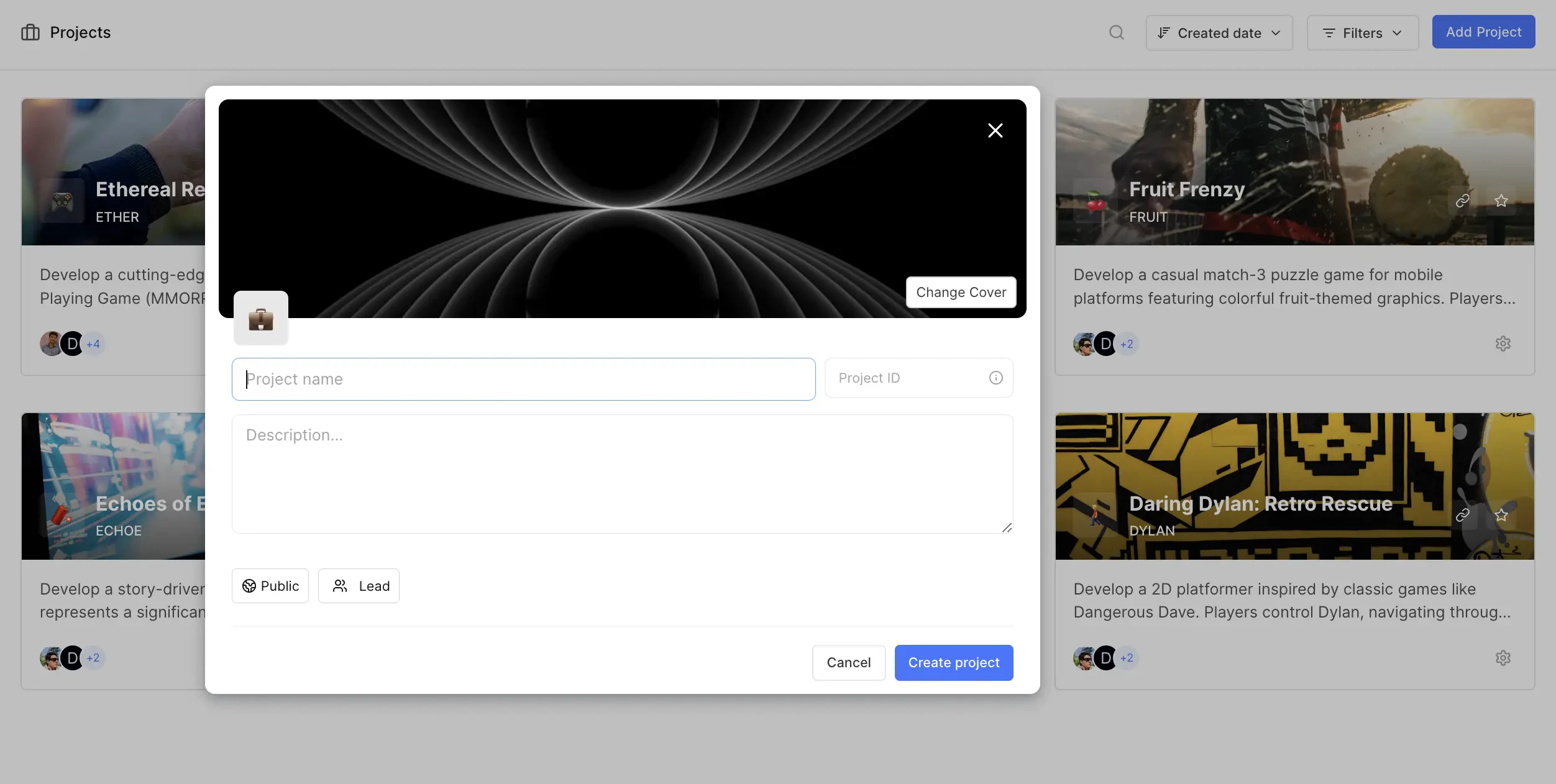
To create a new project in your workspace, you can either press P or head over to the Projects tab in the sidebar and click Add Project. You’ll need to fill in a few key details to set up your project:
Project name Give your project a clear and meaningful name.
Project ID This is like a unique ID attached to every work item in the project, making it easier to track and differentiate them across your workspace. You can update this identifier later if needed.
Description (optional) Provide a brief description to help your team understand what the project is about.
Access Choose whether the project is Private or Public. A public project lets anyone in your workspace join, while a private project means admins will need to invite members.
Lead (optional) You can designate a lead for the project. This person will be the go-to for queries related to the project’s execution.
These attributes can always be edited later under the General tab in the project’s settings.
Each project can have its own timezone setting, managed by project admins. The project timezone affects how dates and times are displayed within the project context. For example, the Cycle schedules (start and end) will align with the timezone set here. However, Members will see Cycles starting and stopping based on the timezone set in their profile settings.
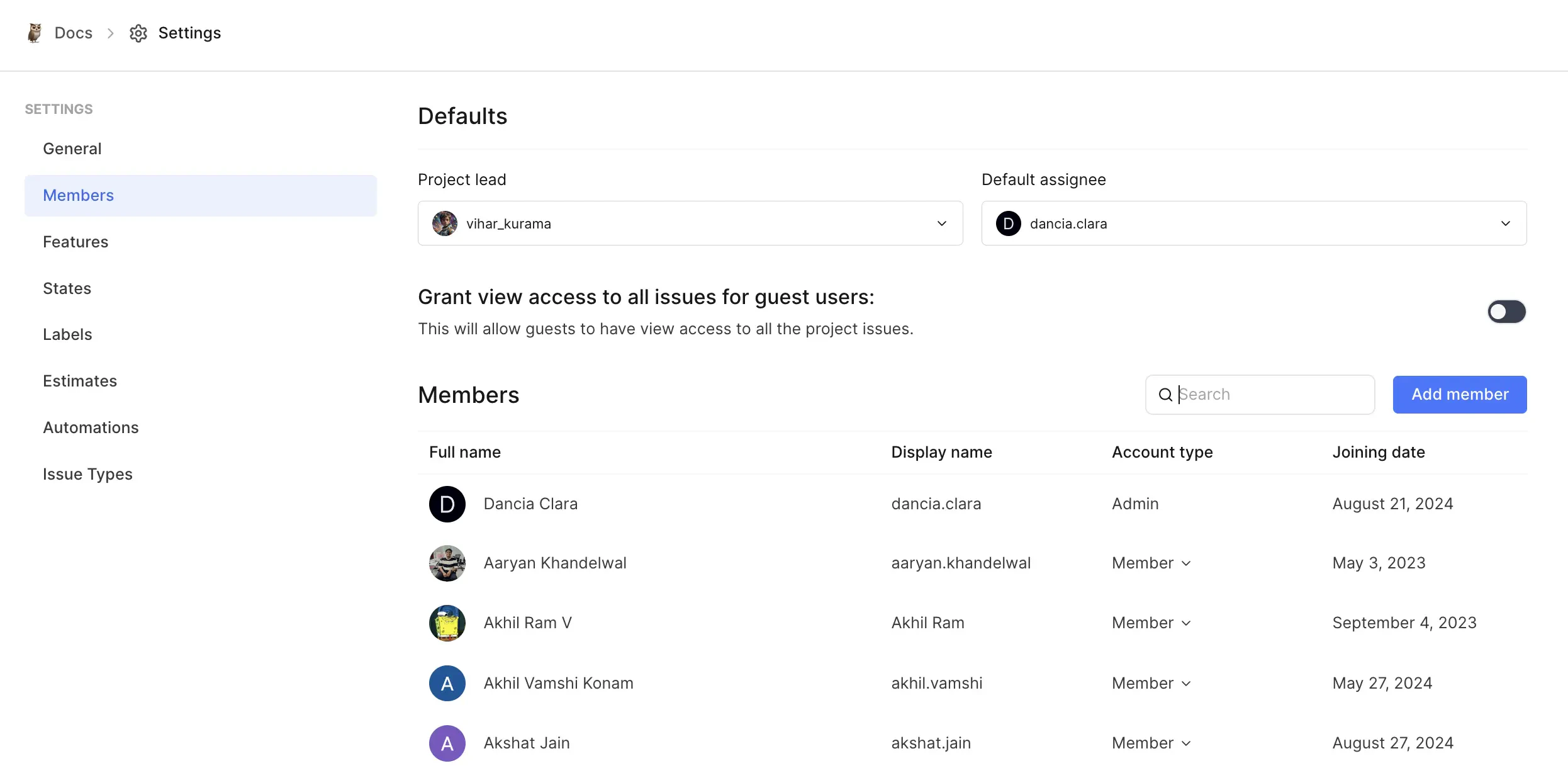
To get others involved in your project, they first need to be part of your workspace. Invite them to the workspace.Once they’re in the workspace, you can invite them to join the project and assign roles like Admin, Member, or Guest. You can always update their roles later if needed.If you want to make sure every work item gets assigned, you can set a Default assignee for when work items are created without one. This ensures nothing slips through the cracks.
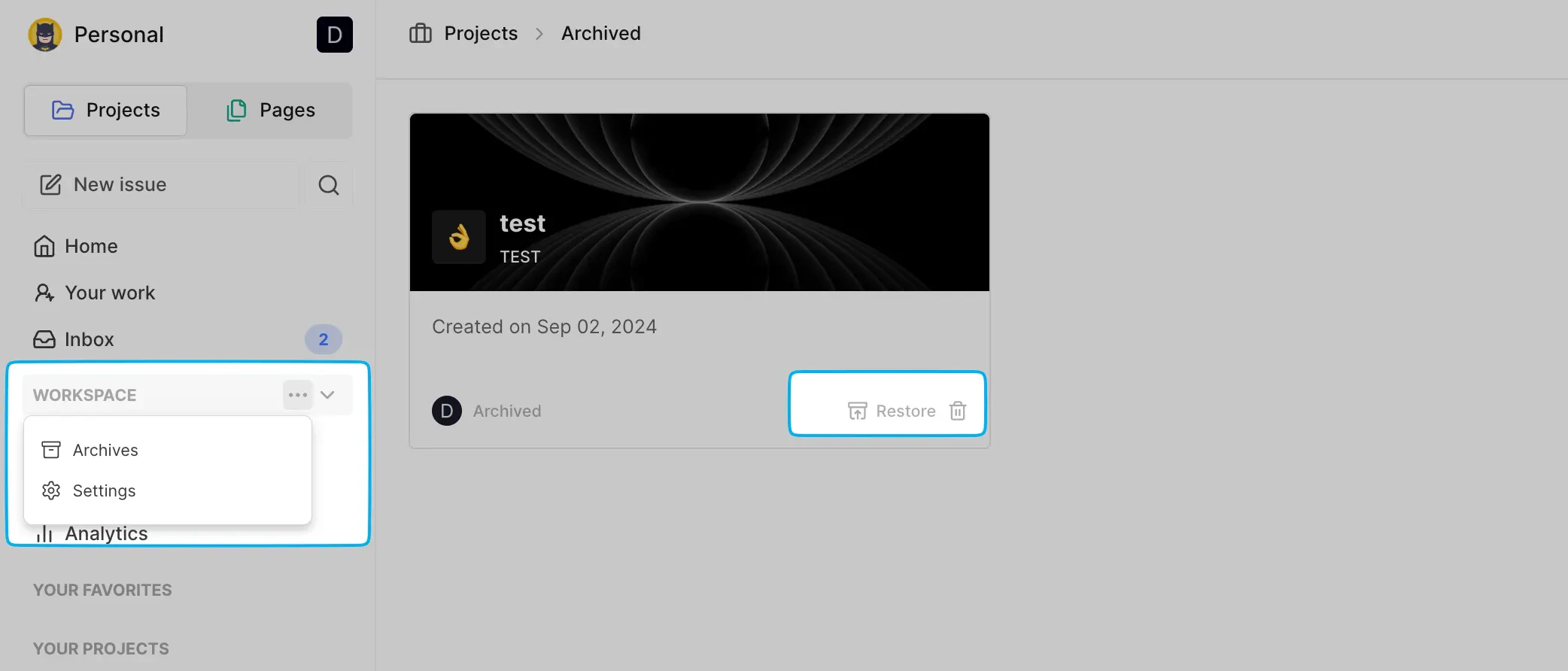
You can archive a project in Project settings. Archiving a project will remove it from your sidebar, keeping your workspace clean and focused on active projects. However, you can still access the archived project and easily restore or delete it permanently at any time.
You can delete a project to completely remove it in Project settings. However, be careful—once deleted, everything tied to that project, like work items, cycles, views, modules, and pages, are also deleted.
Right now, Plane doesn’t offer a way to recover a deleted project, so be sure before you hit delete.
When attempting to create a new project, the page auto-refreshes, but no project is created.This issue typically occurs in self-hosted instances when the Unsplash API key configured in your instance has expired or is invalid.Update the Unsplash Access key in God mode to resolve this issue.
{"docsConfig":{"theme":"mint","$schema":"https://mintlify.com/docs.json","name":"Onestack documentation","colors":{"primary":"#000000","light":"#FFFFFF","dark":"#000000"},"logo":{"light":"https://mintcdn.com/onestack/nDuovMY_chq3cDIQ/logo/logo_black_text.png?fit=max\u0026auto=format\u0026n=nDuovMY_chq3cDIQ\u0026q=85\u0026s=ec34381bfbbd0a76ddcc084b8dbfaf00","dark":"https://mintcdn.com/onestack/nDuovMY_chq3cDIQ/logo/logo_white_text.png?fit=max\u0026auto=format\u0026n=nDuovMY_chq3cDIQ\u0026q=85\u0026s=86c116a136e2b609c8ad7b7a5e4363e4"},"favicon":"/logo/logo-black_whitebg.png","navbar":{"links":[{"label":"Support","href":"mailto:support@onestack.cloud"}],"primary":{"type":"button","label":"Dashboard","href":"https://app.onestack.cloud"}},"footer":{"socials":{"github":"https://github.com/Onestack-cloud","linkedin":"https://linkedin.com/company/onestack-cloud"}},"navigation":{"global":{"anchors":[{"anchor":"Back to Onestack","icon":"house","href":"https://onestack.cloud"},{"anchor":"Community","icon":"telegram","href":"https://community.onestack.cloud"},{"anchor":"Blog","icon":"newspaper","href":"https://blog.onestack.cloud"}]},"pages":[]}},"deployment":{"deploymentMetadataValue":{"subdomain":"onestack","hasAudioNarration":false,"actualSubdomain":"onestack","customDomains":["docs.onestack.cloud"],"gitSource":{"type":"github","owner":"curiousgeorgios","repo":"docs","deployBranch":"main","contentDirectory":"","isPrivate":false,"mountPath":"","label":""},"entitlements":{},"buildId":"6ae925b738a52af76f4046a6:success","clientVersion":"0.0.4094","searchFilterCounts":[{"language":"default","tag":"Scheduling","count":70},{"language":"default","tag":"Documentation","count":70},{"language":"default","tag":"Document Signing","count":48},{"language":"default","tag":"Project Management","count":45},{"language":"default","tag":"Event Types","count":40},{"language":"default","tag":"Developer Guide","count":27},{"language":"default","tag":"User Guide","count":20},{"language":"default","tag":"Embedding","count":14},{"language":"default","tag":"Project + work management","count":11},{"language":"default","tag":"Apps and Integrations","count":8}]},"assistantConfig":{},"basePath":"","hasChatPermissions":false,"hasWebMcpPermissions":false,"toggles":[{"name":"kill-isr","enabled":true,"variant":{"name":"disabled","enabled":false,"feature_enabled":true},"impressionData":false},{"name":"agent-mintlify-slack","enabled":true,"variant":{"name":"disabled","enabled":false,"feature_enabled":true},"impressionData":false},{"name":"agent-integrations-settings","enabled":true,"variant":{"name":"disabled","enabled":false,"feature_enabled":true},"impressionData":false},{"name":"rbac-expansion","enabled":true,"variant":{"name":"disabled","enabled":false,"feature_enabled":true},"impressionData":false},{"name":"automations-pr-grouping","enabled":true,"variant":{"name":"disabled","enabled":false,"feature_enabled":true},"impressionData":false},{"name":"custom-prefix","enabled":true,"variant":{"name":"disabled","enabled":false,"feature_enabled":true},"impressionData":false},{"name":"analytics-v7","enabled":true,"variant":{"name":"disabled","enabled":false,"feature_enabled":true},"impressionData":false},{"name":"user-flows-analytics","enabled":true,"variant":{"name":"disabled","enabled":false,"feature_enabled":true},"impressionData":false},{"name":"no-publish-flow","enabled":true,"variant":{"name":"disabled","enabled":false,"feature_enabled":true},"impressionData":false},{"name":"workos-onboarding","enabled":true,"variant":{"name":"disabled","enabled":false,"feature_enabled":true},"impressionData":false},{"name":"llms-txt-v2","enabled":true,"variant":{"name":"disabled","enabled":false,"feature_enabled":true},"impressionData":false},{"name":"snapshot-serving-live","enabled":true,"variant":{"name":"disabled","enabled":false,"feature_enabled":true},"impressionData":false},{"name":"stripTemperatureMiddleware","enabled":true,"variant":{"name":"disabled","enabled":false,"feature_enabled":true},"impressionData":false},{"name":"support-platform-pylon-zendesk","enabled":true,"variant":{"name":"disabled","enabled":false,"feature_enabled":true},"impressionData":false},{"name":"snapshot-serving","enabled":true,"variant":{"name":"disabled","enabled":false,"feature_enabled":true},"impressionData":false},{"name":"instant-rollback","enabled":true,"variant":{"name":"disabled","enabled":false,"feature_enabled":true},"impressionData":false},{"name":"granular-notifications-server","enabled":true,"variant":{"name":"disabled","enabled":false,"feature_enabled":true},"impressionData":false},{"name":"granular-notifications","enabled":true,"variant":{"name":"disabled","enabled":false,"feature_enabled":true},"impressionData":false},{"name":"automations-fable","enabled":true,"variant":{"name":"disabled","enabled":false,"feature_enabled":true},"impressionData":false},{"name":"fixed-ai-action-pricing","enabled":true,"variant":{"name":"disabled","enabled":false,"feature_enabled":true},"impressionData":false},{"name":"automation-resolve-merge-conflict","enabled":true,"variant":{"name":"disabled","enabled":false,"feature_enabled":true},"impressionData":false},{"name":"scoped-publishing","enabled":true,"variant":{"name":"disabled","enabled":false,"feature_enabled":true},"impressionData":false},{"name":"mintql","enabled":true,"variant":{"name":"disabled","enabled":false,"feature_enabled":true},"impressionData":false},{"name":"page-level-analytics","enabled":true,"variant":{"name":"disabled","enabled":false,"feature_enabled":true},"impressionData":false},{"name":"editor-version-history-v2","enabled":true,"variant":{"name":"disabled","enabled":false,"feature_enabled":true},"impressionData":false},{"name":"billing-page-v2","enabled":true,"variant":{"name":"disabled","enabled":false,"feature_enabled":true},"impressionData":false},{"name":"full-page-search","enabled":true,"variant":{"name":"disabled","enabled":false,"feature_enabled":true},"impressionData":false},{"name":"workspace-projects","enabled":true,"variant":{"name":"disabled","enabled":false,"feature_enabled":true},"impressionData":false},{"name":"assistant-v5","enabled":true,"variant":{"name":"disabled","enabled":false,"feature_enabled":true},"impressionData":false},{"name":"fork-pr-previews","enabled":true,"variant":{"name":"disabled","enabled":false,"feature_enabled":true},"impressionData":false},{"name":"revalidation-jwt","enabled":true,"variant":{"name":"disabled","enabled":false,"feature_enabled":true},"impressionData":false},{"name":"workos-sso-scim","enabled":true,"variant":{"name":"disabled","enabled":false,"feature_enabled":true},"impressionData":false},{"name":"hobby-abuse-scan","enabled":true,"variant":{"name":"disabled","enabled":false,"feature_enabled":true},"impressionData":false},{"name":"dashboard-inbox","enabled":true,"variant":{"name":"disabled","enabled":false,"feature_enabled":true},"impressionData":false},{"name":"workos-signup","enabled":true,"variant":{"name":"disabled","enabled":false,"feature_enabled":true},"impressionData":false},{"name":"turbopuffer-dual-write","enabled":true,"variant":{"name":"disabled","enabled":false,"feature_enabled":true},"impressionData":false},{"name":"workos-enabled","enabled":true,"variant":{"name":"disabled","enabled":false,"feature_enabled":true},"impressionData":false},{"name":"approve-review-flow","enabled":true,"variant":{"name":"disabled","enabled":false,"feature_enabled":true},"impressionData":false},{"name":"editor-metadata","enabled":true,"variant":{"name":"disabled","enabled":false,"feature_enabled":true},"impressionData":false},{"name":"sso-setup-deadline-banner","enabled":true,"variant":{"name":"disabled","enabled":false,"feature_enabled":true},"impressionData":false},{"name":"turbopuffer-serve","enabled":true,"variant":{"name":"disabled","enabled":false,"feature_enabled":true},"impressionData":false},{"name":"live-agents","enabled":true,"variant":{"name":"disabled","enabled":false,"feature_enabled":true},"impressionData":false},{"name":"comment-mode","enabled":true,"variant":{"name":"disabled","enabled":false,"feature_enabled":true},"impressionData":false}],"googleFontsInlined":false},"customCss":[{"filePath":"documenso-docs/apps/documentation/styles.css","content":"@tailwind base;@tailwind components;@tailwind utilities;"},{"filePath":"documenso-docs/apps/documentation/styles/globals.css","content":"@tailwind base;@tailwind components;@tailwind utilities;"}],"page":{"pagePath":"plane_docs/core-concepts/projects/overview","slug":"/plane_docs/core-concepts/projects/overview","pageMetadata":{"title":"Projects","description":"Projects let you manage your teams, tasks, and everything you need to get things done within your workspace. Once you've set up your , the next step is to create a Project. Each project acts as a container for your work, bringing together the work items, cycles, modules, and all the other tasks you and your team need to manage.","href":"/plane_docs/core-concepts/projects/overview"},"description":{"compiledSource":"\"use strict\";\nconst {jsx: _jsx} = arguments[0];\nconst {useMDXComponents: _provideComponents} = arguments[0];\nfunction _createMdxContent(props) {\n const _components = {\n p: \"p\",\n ..._provideComponents(),\n ...props.components\n };\n return _jsx(_components.p, {\n children: \"Projects let you manage your teams, tasks, and everything you need to get things done within your workspace. Once you’ve set up your , the next step is to create a Project. Each project acts as a container for your work, bringing together the work items, cycles, modules, and all the other tasks you and your team need to manage.\"\n });\n}\nfunction MDXContent(props = {}) {\n const {wrapper: MDXLayout} = {\n ..._provideComponents(),\n ...props.components\n };\n return MDXLayout ? _jsx(MDXLayout, {\n ...props,\n children: _jsx(_createMdxContent, {\n ...props\n })\n }) : _createMdxContent(props);\n}\nreturn {\n default: MDXContent\n};\n","frontmatter":{},"scope":{}},"pageType":"default","mdx":{"mdxSource":{"compiledSource":"\"use strict\";const{Fragment:_Fragment,jsx:_jsx,jsxs:_jsxs}=arguments[0];const{useMDXComponents:_provideComponents}=arguments[0];function _createMdxContent(props){const _components={a:`a`,code:`code`,li:`li`,p:`p`,strong:`strong`,ul:`ul`,..._provideComponents(),...props.components},{Heading,OptimizedImage,Warning}=_components;if(!Heading)_missingMdxReference(`Heading`,true);if(!OptimizedImage)_missingMdxReference(`OptimizedImage`,true);if(!Warning)_missingMdxReference(`Warning`,true);return _jsxs(_Fragment,{children:[_jsxs(Heading,{level:`2`,id:`create-project`,children:[`Create project`,_jsx(_components.a,{href:`#create-project`,title:`Direct link to Create project`,children:``})]}),`\n`,_jsxs(_components.p,{children:[`To create a new project in your workspace, you can either press `,_jsx(_components.code,{children:`P`}),` or head over to the `,_jsx(_components.strong,{children:`Projects`}),` tab in the sidebar and click `,_jsx(_components.strong,{children:`Add Project`}),`. You’ll need to fill in a few key details to set up your project:`]}),`\n`,_jsxs(_components.ul,{children:[`\n`,_jsxs(_components.li,{children:[_jsx(_components.strong,{children:`Project name`}),` Give your project a clear and meaningful name.`]}),`\n`,_jsxs(_components.li,{children:[_jsx(_components.strong,{children:`Project ID`}),` This is like a unique ID attached to every work item in the project, making it easier to track and differentiate them across your workspace. You can update this identifier later if needed.`]}),`\n`,_jsxs(_components.li,{children:[_jsx(_components.strong,{children:`Description (optional)`}),` Provide a brief description to help your team understand what the project is about.`]}),`\n`,_jsxs(_components.li,{children:[_jsx(_components.strong,{children:`Access`}),` Choose whether the project is `,_jsx(_components.strong,{children:`Private`}),` or `,_jsx(_components.strong,{children:`Public`}),`. A public project lets anyone in your workspace join, while a private project means admins will need to invite members.`]}),`\n`,_jsxs(_components.li,{children:[_jsx(_components.strong,{children:`Lead (optional)`}),` You can designate a lead for the project. This person will be the go-to for queries related to the project’s execution.`]}),`\n`]}),`\n`,_jsxs(_components.p,{children:[`These attributes can always be edited later under the `,_jsx(_components.strong,{children:`General`}),` tab in the `,_jsx(_components.a,{href:`#project-settings`,children:`project’s settings`}),`.`]}),`\n`,_jsx(OptimizedImage,{src:`https://mintcdn.com/onestack/z86cTvf0kthNuDVJ/images/core-concepts/projects/projects/create-project.webp?fit=max\u0026auto=format\u0026n=z86cTvf0kthNuDVJ\u0026q=85\u0026s=fbb5883c99e7bbd0638867976c111ae3`,alt:`Create project`,\"data-og-width\":`2504`,width:`2504`,\"data-og-height\":`1262`,height:`1262`,\"data-path\":`images/core-concepts/projects/projects/create-project.webp`,\"data-optimize\":`true`,\"data-opv\":`3`,srcset:`https://mintcdn.com/onestack/z86cTvf0kthNuDVJ/images/core-concepts/projects/projects/create-project.webp?w=280\u0026fit=max\u0026auto=format\u0026n=z86cTvf0kthNuDVJ\u0026q=85\u0026s=e90a054c4792e1007d61ec639750df38 280w, https://mintcdn.com/onestack/z86cTvf0kthNuDVJ/images/core-concepts/projects/projects/create-project.webp?w=560\u0026fit=max\u0026auto=format\u0026n=z86cTvf0kthNuDVJ\u0026q=85\u0026s=41deb14613007ffc889891dbf92f3259 560w, https://mintcdn.com/onestack/z86cTvf0kthNuDVJ/images/core-concepts/projects/projects/create-project.webp?w=840\u0026fit=max\u0026auto=format\u0026n=z86cTvf0kthNuDVJ\u0026q=85\u0026s=bd438660be144582093db096d57ef82b 840w, https://mintcdn.com/onestack/z86cTvf0kthNuDVJ/images/core-concepts/projects/projects/create-project.webp?w=1100\u0026fit=max\u0026auto=format\u0026n=z86cTvf0kthNuDVJ\u0026q=85\u0026s=3e248aab8482d9f044558b3c38b0dc63 1100w, https://mintcdn.com/onestack/z86cTvf0kthNuDVJ/images/core-concepts/projects/projects/create-project.webp?w=1650\u0026fit=max\u0026auto=format\u0026n=z86cTvf0kthNuDVJ\u0026q=85\u0026s=40c03f2beb9b07ad80a2d41008e2903e 1650w, https://mintcdn.com/onestack/z86cTvf0kthNuDVJ/images/core-concepts/projects/projects/create-project.webp?w=2500\u0026fit=max\u0026auto=format\u0026n=z86cTvf0kthNuDVJ\u0026q=85\u0026s=e688b75a5556bdf7eaf4a4fce13173a0 2500w`}),`\n`,_jsxs(Heading,{level:`2`,id:`project-settings`,children:[`Project settings`,_jsx(_components.a,{href:`#project-settings`,title:`Direct link to Project settings`,children:``})]}),`\n`,_jsxs(_components.p,{children:[`Click the `,_jsx(_components.strong,{children:`…`}),` icon next to your project name on the sidebar and click `,_jsx(_components.strong,{children:`Settings`}),`. `,_jsx(OptimizedImage,{src:`https://mintcdn.com/onestack/sKLGy5fzb64EtPH3/images/core-concepts/projects/projects/project-settings.webp?fit=max\u0026auto=format\u0026n=sKLGy5fzb64EtPH3\u0026q=85\u0026s=95dfe64dcc7f3b1c373567f30c162aa7`,alt:`Project settings`,\"data-og-width\":`2990`,width:`2990`,\"data-og-height\":`1714`,height:`1714`,\"data-path\":`images/core-concepts/projects/projects/project-settings.webp`,\"data-optimize\":`true`,\"data-opv\":`3`,srcset:`https://mintcdn.com/onestack/sKLGy5fzb64EtPH3/images/core-concepts/projects/projects/project-settings.webp?w=280\u0026fit=max\u0026auto=format\u0026n=sKLGy5fzb64EtPH3\u0026q=85\u0026s=829c2c5c185366d191a48969093bd579 280w, https://mintcdn.com/onestack/sKLGy5fzb64EtPH3/images/core-concepts/projects/projects/project-settings.webp?w=560\u0026fit=max\u0026auto=format\u0026n=sKLGy5fzb64EtPH3\u0026q=85\u0026s=c1728b976c136026502c41995cec360a 560w, https://mintcdn.com/onestack/sKLGy5fzb64EtPH3/images/core-concepts/projects/projects/project-settings.webp?w=840\u0026fit=max\u0026auto=format\u0026n=sKLGy5fzb64EtPH3\u0026q=85\u0026s=d385f8f4a3b590566bd2d7f5f3d31486 840w, https://mintcdn.com/onestack/sKLGy5fzb64EtPH3/images/core-concepts/projects/projects/project-settings.webp?w=1100\u0026fit=max\u0026auto=format\u0026n=sKLGy5fzb64EtPH3\u0026q=85\u0026s=2a0c8c8187ec09b56fa826ee0fb74da9 1100w, https://mintcdn.com/onestack/sKLGy5fzb64EtPH3/images/core-concepts/projects/projects/project-settings.webp?w=1650\u0026fit=max\u0026auto=format\u0026n=sKLGy5fzb64EtPH3\u0026q=85\u0026s=8adce343d91034cf430c287c50430c08 1650w, https://mintcdn.com/onestack/sKLGy5fzb64EtPH3/images/core-concepts/projects/projects/project-settings.webp?w=2500\u0026fit=max\u0026auto=format\u0026n=sKLGy5fzb64EtPH3\u0026q=85\u0026s=3f8291041d04b6634690138dbba94f3d 2500w`})]}),`\n`,_jsxs(Heading,{level:`3`,id:`project-timezone`,children:[`Project timezone`,_jsx(_components.a,{href:`#project-timezone`,title:`Direct link to Project timezone`,children:``})]}),`\n`,_jsxs(_components.p,{children:[`Each project can have its own timezone setting, managed by project admins. The project timezone affects how dates and times are displayed within the project context. For example, the Cycle schedules (start and end) will align with the timezone set here. However, Members will see Cycles starting and stopping based on the timezone set in their `,_jsx(_components.a,{href:`/core-concepts/account/settings#timezone-and-language`,children:`profile settings`}),`.`]}),`\n`,_jsxs(Heading,{level:`2`,id:`add-and-manage-members`,children:[`Add and manage members`,_jsx(_components.a,{href:`#add-and-manage-members`,title:`Direct link to Add and manage members`,children:``})]}),`\n`,_jsxs(_components.p,{children:[`To get others involved in your project, they first need to be part of your workspace. `,_jsx(_components.a,{href:`/core-concepts/workspaces/members#add-member`,children:`Invite them`}),` to the workspace.`]}),`\n`,_jsxs(_components.p,{children:[`Once they’re in the workspace, you can invite them to join the project and assign roles like `,_jsx(_components.strong,{children:`Admin`}),`, `,_jsx(_components.strong,{children:`Member`}),`, or `,_jsx(_components.strong,{children:`Guest`}),`. You can always update their roles later if needed.`]}),`\n`,_jsxs(_components.p,{children:[`If you want to make sure every work item gets assigned, you can set a `,_jsx(_components.strong,{children:`Default assignee`}),` for when work items are created without one. This ensures nothing slips through the cracks.`]}),`\n`,_jsx(OptimizedImage,{src:`https://mintcdn.com/onestack/z86cTvf0kthNuDVJ/images/core-concepts/projects/projects/project-members.webp?fit=max\u0026auto=format\u0026n=z86cTvf0kthNuDVJ\u0026q=85\u0026s=26c21e114bbb9393479a198eaa4068f8`,alt:`Project members`,\"data-og-width\":`2492`,width:`2492`,\"data-og-height\":`1228`,height:`1228`,\"data-path\":`images/core-concepts/projects/projects/project-members.webp`,\"data-optimize\":`true`,\"data-opv\":`3`,srcset:`https://mintcdn.com/onestack/z86cTvf0kthNuDVJ/images/core-concepts/projects/projects/project-members.webp?w=280\u0026fit=max\u0026auto=format\u0026n=z86cTvf0kthNuDVJ\u0026q=85\u0026s=b04d2f6466b514be6f579eeb08582aea 280w, https://mintcdn.com/onestack/z86cTvf0kthNuDVJ/images/core-concepts/projects/projects/project-members.webp?w=560\u0026fit=max\u0026auto=format\u0026n=z86cTvf0kthNuDVJ\u0026q=85\u0026s=f72beeb0ef6425e2acd022bcb569703c 560w, https://mintcdn.com/onestack/z86cTvf0kthNuDVJ/images/core-concepts/projects/projects/project-members.webp?w=840\u0026fit=max\u0026auto=format\u0026n=z86cTvf0kthNuDVJ\u0026q=85\u0026s=0cdb80104fd1321fb7c65c5942d55380 840w, https://mintcdn.com/onestack/z86cTvf0kthNuDVJ/images/core-concepts/projects/projects/project-members.webp?w=1100\u0026fit=max\u0026auto=format\u0026n=z86cTvf0kthNuDVJ\u0026q=85\u0026s=9f39283b26096e6fff8071a02bf91241 1100w, https://mintcdn.com/onestack/z86cTvf0kthNuDVJ/images/core-concepts/projects/projects/project-members.webp?w=1650\u0026fit=max\u0026auto=format\u0026n=z86cTvf0kthNuDVJ\u0026q=85\u0026s=01da010c743c740adf81dac882dedfdd 1650w, https://mintcdn.com/onestack/z86cTvf0kthNuDVJ/images/core-concepts/projects/projects/project-members.webp?w=2500\u0026fit=max\u0026auto=format\u0026n=z86cTvf0kthNuDVJ\u0026q=85\u0026s=997aedebee99b19e36e2b3d3bdd93ac8 2500w`}),`\n`,_jsxs(Heading,{level:`2`,id:`enable-features`,children:[`Enable features`,_jsx(_components.a,{href:`#enable-features`,title:`Direct link to Enable features`,children:``})]}),`\n`,_jsx(_components.p,{children:`After creating a project, you can turn on specific features based on your requirements:`}),`\n`,_jsxs(_components.ul,{children:[`\n`,_jsxs(_components.li,{children:[_jsx(_components.strong,{children:`Cycles`}),`: Timebox work items in your project, helping to build momentum and keep things moving forward.`]}),`\n`,_jsxs(_components.li,{children:[_jsx(_components.strong,{children:`Modules`}),`: Group related work items together logically, making it easier to manage large projects.`]}),`\n`,_jsxs(_components.li,{children:[_jsx(_components.strong,{children:`Views`}),`: Create custom views with filters and save them for quick access later.`]}),`\n`,_jsxs(_components.li,{children:[_jsx(_components.strong,{children:`Pages`}),`: Document information, ideas, and guides related to your project.`]}),`\n`,_jsxs(_components.li,{children:[_jsx(_components.strong,{children:`Intake`}),`: Capture incoming requests for your project and quickly add them to your workflow.`]}),`\n`,_jsxs(_components.li,{children:[_jsx(_components.strong,{children:`Time Tracking`}),` - Log time spent on work items and download worklogs.`]}),`\n`]}),`\n`,_jsx(OptimizedImage,{src:`https://mintcdn.com/onestack/z86cTvf0kthNuDVJ/images/core-concepts/projects/projects/project-features.webp?fit=max\u0026auto=format\u0026n=z86cTvf0kthNuDVJ\u0026q=85\u0026s=d14fcf61ad1d2b1587735f91e5669344`,alt:`Project features`,\"data-og-width\":`2510`,width:`2510`,\"data-og-height\":`1286`,height:`1286`,\"data-path\":`images/core-concepts/projects/projects/project-features.webp`,\"data-optimize\":`true`,\"data-opv\":`3`,srcset:`https://mintcdn.com/onestack/z86cTvf0kthNuDVJ/images/core-concepts/projects/projects/project-features.webp?w=280\u0026fit=max\u0026auto=format\u0026n=z86cTvf0kthNuDVJ\u0026q=85\u0026s=f70485247c4ce708ed98d8664a069ac2 280w, https://mintcdn.com/onestack/z86cTvf0kthNuDVJ/images/core-concepts/projects/projects/project-features.webp?w=560\u0026fit=max\u0026auto=format\u0026n=z86cTvf0kthNuDVJ\u0026q=85\u0026s=21b90b3a936568f3e819062782dfa740 560w, https://mintcdn.com/onestack/z86cTvf0kthNuDVJ/images/core-concepts/projects/projects/project-features.webp?w=840\u0026fit=max\u0026auto=format\u0026n=z86cTvf0kthNuDVJ\u0026q=85\u0026s=f8bc8d5c39eb71ede506b67f476a4f62 840w, https://mintcdn.com/onestack/z86cTvf0kthNuDVJ/images/core-concepts/projects/projects/project-features.webp?w=1100\u0026fit=max\u0026auto=format\u0026n=z86cTvf0kthNuDVJ\u0026q=85\u0026s=7b5d7cddcbfa29bdc18b2c0bc0e4b06b 1100w, https://mintcdn.com/onestack/z86cTvf0kthNuDVJ/images/core-concepts/projects/projects/project-features.webp?w=1650\u0026fit=max\u0026auto=format\u0026n=z86cTvf0kthNuDVJ\u0026q=85\u0026s=9db3b37612fdc2efb7bc1e931341d293 1650w, https://mintcdn.com/onestack/z86cTvf0kthNuDVJ/images/core-concepts/projects/projects/project-features.webp?w=2500\u0026fit=max\u0026auto=format\u0026n=z86cTvf0kthNuDVJ\u0026q=85\u0026s=8bce5bfa24b80b2590993fe8f6d49219 2500w`}),`\n`,_jsxs(Heading,{level:`2`,id:`archive-project`,children:[`Archive Project`,_jsx(_components.a,{href:`#archive-project`,title:`Direct link to Archive Project`,children:``})]}),`\n`,_jsxs(_components.p,{children:[`You can archive a project in `,_jsx(_components.a,{href:`/core-concepts/projects/overview#project-settings`,children:`Project settings`}),`. Archiving a project will remove it from your sidebar, keeping your workspace clean and focused on active projects. However, you can still access the archived project and easily restore or delete it permanently at any time.`]}),`\n`,_jsx(OptimizedImage,{src:`https://mintcdn.com/onestack/z86cTvf0kthNuDVJ/images/core-concepts/projects/projects/archived-projects.webp?fit=max\u0026auto=format\u0026n=z86cTvf0kthNuDVJ\u0026q=85\u0026s=4f243c78ac9e476a6285a3821fb3249f`,alt:`Archived Projects`,\"data-og-width\":`2084`,width:`2084`,\"data-og-height\":`892`,height:`892`,\"data-path\":`images/core-concepts/projects/projects/archived-projects.webp`,\"data-optimize\":`true`,\"data-opv\":`3`,srcset:`https://mintcdn.com/onestack/z86cTvf0kthNuDVJ/images/core-concepts/projects/projects/archived-projects.webp?w=280\u0026fit=max\u0026auto=format\u0026n=z86cTvf0kthNuDVJ\u0026q=85\u0026s=a444721402882f0ee238e367371edc85 280w, https://mintcdn.com/onestack/z86cTvf0kthNuDVJ/images/core-concepts/projects/projects/archived-projects.webp?w=560\u0026fit=max\u0026auto=format\u0026n=z86cTvf0kthNuDVJ\u0026q=85\u0026s=37ab406f35450e18f8f9334a0e79920f 560w, https://mintcdn.com/onestack/z86cTvf0kthNuDVJ/images/core-concepts/projects/projects/archived-projects.webp?w=840\u0026fit=max\u0026auto=format\u0026n=z86cTvf0kthNuDVJ\u0026q=85\u0026s=cfcaae9d5c32389852e07ee550e1f2c3 840w, https://mintcdn.com/onestack/z86cTvf0kthNuDVJ/images/core-concepts/projects/projects/archived-projects.webp?w=1100\u0026fit=max\u0026auto=format\u0026n=z86cTvf0kthNuDVJ\u0026q=85\u0026s=057fb10ec4e8a72efa628c26264bb957 1100w, https://mintcdn.com/onestack/z86cTvf0kthNuDVJ/images/core-concepts/projects/projects/archived-projects.webp?w=1650\u0026fit=max\u0026auto=format\u0026n=z86cTvf0kthNuDVJ\u0026q=85\u0026s=b16a4bb42e538ce53a33beb952f3f90b 1650w, https://mintcdn.com/onestack/z86cTvf0kthNuDVJ/images/core-concepts/projects/projects/archived-projects.webp?w=2500\u0026fit=max\u0026auto=format\u0026n=z86cTvf0kthNuDVJ\u0026q=85\u0026s=3d6f2b2dee28cacd9db6dce7bb11be78 2500w`}),`\n`,_jsxs(Heading,{level:`2`,id:`delete-project`,children:[`Delete Project`,_jsx(_components.a,{href:`#delete-project`,title:`Direct link to Delete Project`,children:``})]}),`\n`,_jsxs(_components.p,{children:[`You can delete a project to completely remove it in `,_jsx(_components.a,{href:`/core-concepts/projects/overview#project-settings`,children:`Project settings`}),`. However, be careful—once deleted, everything tied to that project, like work items, cycles, views, modules, and pages, are also deleted.`]}),`\n`,_jsx(Warning,{children:_jsx(_components.p,{children:`Right now, Plane doesn’t offer a way to recover a deleted project, so be sure before you hit delete.`})}),`\n`,_jsxs(Heading,{level:`2`,id:`troubleshooting`,children:[`Troubleshooting`,_jsx(_components.a,{href:`#troubleshooting`,title:`Direct link to Troubleshooting`,children:``})]}),`\n`,_jsxs(Heading,{level:`3`,id:`unable-to-create-new-projects`,children:[`Unable to create new projects`,_jsx(_components.a,{href:`#unable-to-create-new-projects`,title:`Direct link to Unable to create new projects`,children:``})]}),`\n`,_jsx(_components.p,{children:`When attempting to create a new project, the page auto-refreshes, but no project is created.`}),`\n`,_jsxs(_components.p,{children:[`This issue typically occurs in `,_jsx(_components.strong,{children:`self-hosted instances`}),` when the Unsplash API key configured in your instance has expired or is invalid.`]}),`\n`,_jsxs(_components.p,{children:[`Update the `,_jsx(_components.a,{href:`https://developers.plane.so/self-hosting/govern/instance-admin#images-in-plane`,children:`Unsplash Access key`}),` in God mode to resolve this issue.`]})]})}function MDXContent(props={}){const{wrapper:MDXLayout}={..._provideComponents(),...props.components};return MDXLayout?_jsx(MDXLayout,{...props,children:_jsx(_createMdxContent,{...props})}):_createMdxContent(props)}return{default:MDXContent};function _missingMdxReference(id,component){throw new Error(`Expected `+(component?`component`:`object`)+\" `\"+id+\"` to be defined: you likely forgot to import, pass, or provide it.\")}","frontmatter":{},"scope":{"config":{},"pageMetadata":{"title":"Projects","description":"Projects let you manage your teams, tasks, and everything you need to get things done within your workspace. Once you've set up your , the next step is to create a Project. Each project acts as a container for your work, bringing together the work items, cycles, modules, and all the other tasks you and your team need to manage.","href":"/plane_docs/core-concepts/projects/overview"}}},"mdxSourceWithNoJs":null},"mdxExtracts":{"tableOfContents":[{"title":"Create project","slug":"create-project","depth":2,"children":[]},{"title":"Project settings","slug":"project-settings","depth":2,"children":[{"title":"Project timezone","slug":"project-timezone","depth":3,"children":[]}]},{"title":"Add and manage members","slug":"add-and-manage-members","depth":2,"children":[]},{"title":"Enable features","slug":"enable-features","depth":2,"children":[]},{"title":"Archive Project","slug":"archive-project","depth":2,"children":[]},{"title":"Delete Project","slug":"delete-project","depth":2,"children":[]},{"title":"Troubleshooting","slug":"troubleshooting","depth":2,"children":[{"title":"Unable to create new projects","slug":"unable-to-create-new-projects","depth":3,"children":[]}]}],"codeExamples":{}},"jsLinks":["/_mintlify/custom/onestack/e9b75d94f3331829/documenso-docs/apps/documentation/next.config.js","/_mintlify/custom/onestack/fa650b380adfabb1/documenso-docs/apps/documentation/postcss.config.js","/_mintlify/custom/onestack/feabdf309770ed24/documenso-docs/apps/documentation/public/pdf.worker.min.js","/_mintlify/custom/onestack/b248f5a1a94c3e0f/documenso-docs/apps/documentation/tailwind.config.js"],"subdomain":"onestack","siteName":"Onestack documentation","title":"Projects - Onestack documentation","navMaps":{"firstHrefInVersion":{},"firstHrefInLanguage":{}},"lastModified":"2026-01-07T06:53:32.478Z","originalFileLocation":"plane_docs/core-concepts/projects/overview.mdx"},"headHtml":"\u003cscript data-mint-head>(function(){var d=document.documentElement,p=null;if(!p){try{p=localStorage.getItem(\"isDarkMode\")}catch(e){}if(p==='true')p='dark';else if(p==='false')p='light';if(p!=='light'\u0026\u0026p!=='dark'\u0026\u0026p!=='system')p=\"system\"}var r=p==='system'?(matchMedia(\"(prefers-color-scheme: dark)\").matches?'dark':'light'):p;d.classList.remove(r==='dark'?'light':'dark');d.classList.add(r);d.setAttribute(\"data-theme-preference\",p)})();\u003c/script>\u003cmeta data-mint-head name=\"description\" content=\"Projects let you manage your teams, tasks, and everything you need to get things done within your workspace. Once you\u0026#x27;ve set up your , the next step is to create a Project. Each project acts as a container for your work, bringing together the work items, cycles, modules, and all the other tasks you and your team need to manage.\">\u003cmeta data-mint-head name=\"application-name\" content=\"Onestack documentation\">\u003cmeta data-mint-head name=\"generator\" content=\"Mintlify\">\u003clink data-mint-head rel=\"icon\" type=\"image/png\" sizes=\"192x192\" href=\"/mintlify-assets/_mintlify/favicons/onestack/gEf718rD6Tp_NxgK/_generated/favicon/android-chrome-192x192.png\" media=\"(prefers-color-scheme: light)\">\u003clink data-mint-head rel=\"apple-touch-icon\" type=\"image/png\" sizes=\"180x180\" href=\"/mintlify-assets/_mintlify/favicons/onestack/gEf718rD6Tp_NxgK/_generated/favicon/apple-touch-icon.png\">\u003clink data-mint-head rel=\"icon\" type=\"image/png\" sizes=\"16x16\" href=\"/mintlify-assets/_mintlify/favicons/onestack/gEf718rD6Tp_NxgK/_generated/favicon/favicon-16x16.png\" media=\"(prefers-color-scheme: light)\">\u003clink data-mint-head rel=\"icon\" type=\"image/png\" sizes=\"32x32\" href=\"/mintlify-assets/_mintlify/favicons/onestack/gEf718rD6Tp_NxgK/_generated/favicon/favicon-32x32.png\" media=\"(prefers-color-scheme: light)\">\u003clink data-mint-head rel=\"shortcut icon\" type=\"image/x-icon\" href=\"/mintlify-assets/_mintlify/favicons/onestack/gEf718rD6Tp_NxgK/_generated/favicon/favicon.ico\" media=\"(prefers-color-scheme: light)\">\u003clink data-mint-head rel=\"icon\" type=\"image/png\" sizes=\"192x192\" href=\"/mintlify-assets/_mintlify/favicons/onestack/gEf718rD6Tp_NxgK/_generated/favicon-dark/android-chrome-192x192.png\" media=\"(prefers-color-scheme: dark)\">\u003clink data-mint-head rel=\"icon\" type=\"image/png\" sizes=\"16x16\" href=\"/mintlify-assets/_mintlify/favicons/onestack/gEf718rD6Tp_NxgK/_generated/favicon-dark/favicon-16x16.png\" media=\"(prefers-color-scheme: dark)\">\u003clink data-mint-head rel=\"icon\" type=\"image/png\" sizes=\"32x32\" href=\"/mintlify-assets/_mintlify/favicons/onestack/gEf718rD6Tp_NxgK/_generated/favicon-dark/favicon-32x32.png\" media=\"(prefers-color-scheme: dark)\">\u003clink data-mint-head rel=\"shortcut icon\" type=\"image/x-icon\" href=\"/mintlify-assets/_mintlify/favicons/onestack/gEf718rD6Tp_NxgK/_generated/favicon-dark/favicon.ico\" media=\"(prefers-color-scheme: dark)\">\u003cmeta data-mint-head property=\"og:title\" content=\"Projects - Onestack documentation\">\u003cmeta data-mint-head property=\"og:description\" content=\"Projects let you manage your teams, tasks, and everything you need to get things done within your workspace. Once you\u0026#x27;ve set up your , the next step is to create a Project. Each project acts as a container for your work, bringing together the work items, cycles, modules, and all the other tasks you and your team need to manage.\">\u003cmeta data-mint-head property=\"og:site_name\" content=\"Onestack documentation\">\u003cmeta data-mint-head property=\"og:url\" content=\"https://docs.onestack.cloud/plane_docs/core-concepts/projects/overview\">\u003cmeta data-mint-head property=\"og:type\" content=\"website\">\u003cmeta data-mint-head property=\"og:image\" content=\"https://onestack.mintlify.site/_mintlify/api/og/v2?division=Project+%2B+work+tracking\u0026amp;title=Projects\u0026amp;description=Projects+let+you+manage+your+teams%2C+tasks%2C+and+everything+you+need+to+get+things+done+within+your+workspace.+Once+you%27ve+set+up+your+%2C+the+next+step+is+to+creat\u0026amp;theme=be0c9f2880ace844f8d65386\u0026amp;signature=efd46ae40ae1184f2ea0159631f8d26ac4d9231bc567d48bd78ee95ac33cd8f8\">\u003cmeta data-mint-head property=\"og:image:width\" content=\"1200\">\u003cmeta data-mint-head property=\"og:image:height\" content=\"630\">\u003cmeta data-mint-head name=\"twitter:card\" content=\"summary_large_image\">\u003cmeta data-mint-head name=\"twitter:title\" content=\"Projects - Onestack documentation\">\u003cmeta data-mint-head name=\"twitter:description\" content=\"Projects let you manage your teams, tasks, and everything you need to get things done within your workspace. Once you\u0026#x27;ve set up your , the next step is to create a Project. Each project acts as a container for your work, bringing together the work items, cycles, modules, and all the other tasks you and your team need to manage.\">\u003cmeta data-mint-head name=\"twitter:image\" content=\"https://onestack.mintlify.site/_mintlify/api/og/v2?division=Project+%2B+work+tracking\u0026amp;title=Projects\u0026amp;description=Projects+let+you+manage+your+teams%2C+tasks%2C+and+everything+you+need+to+get+things+done+within+your+workspace.+Once+you%27ve+set+up+your+%2C+the+next+step+is+to+creat\u0026amp;theme=be0c9f2880ace844f8d65386\u0026amp;signature=efd46ae40ae1184f2ea0159631f8d26ac4d9231bc567d48bd78ee95ac33cd8f8\">\u003cmeta data-mint-head name=\"twitter:image:width\" content=\"1200\">\u003cmeta data-mint-head name=\"twitter:image:height\" content=\"630\">\u003cmeta data-mint-head name=\"msapplication-config\" content=\"/mintlify-assets/_mintlify/favicons/onestack/gEf718rD6Tp_NxgK/_generated/favicon/browserconfig.xml\">\u003cmeta data-mint-head name=\"apple-mobile-web-app-title\" content=\"Onestack documentation\">\u003cmeta data-mint-head name=\"msapplication-TileColor\" content=\"#000000\">\u003clink data-mint-head rel=\"canonical\" href=\"https://docs.onestack.cloud/plane_docs/core-concepts/projects/overview\">\u003clink data-mint-head rel=\"alternate\" type=\"application/xml\" href=\"/sitemap.xml\">\u003clink data-mint-head rel=\"alternate\" type=\"text/markdown\" href=\"/plane_docs/core-concepts/projects/overview.md\">\u003cscript data-mint-head type=\"application/ld+json\">{\"@context\":\"https://schema.org\",\"@graph\":[{\"@type\":\"Organization\",\"@id\":\"https://docs.onestack.cloud/#organization\",\"name\":\"Onestack documentation\",\"url\":\"https://docs.onestack.cloud\",\"logo\":{\"@type\":\"ImageObject\",\"url\":\"https://mintcdn.com/onestack/nDuovMY_chq3cDIQ/logo/logo_black_text.png?fit=max\u0026auto=format\u0026n=nDuovMY_chq3cDIQ\u0026q=85\u0026s=ec34381bfbbd0a76ddcc084b8dbfaf00\"}},{\"@type\":\"WebSite\",\"@id\":\"https://docs.onestack.cloud#website\",\"name\":\"Onestack documentation\",\"url\":\"https://docs.onestack.cloud\",\"publisher\":{\"@id\":\"https://docs.onestack.cloud/#organization\"}},{\"@type\":\"WebPage\",\"@id\":\"https://docs.onestack.cloud/plane_docs/core-concepts/projects/overview#webpage\",\"url\":\"https://docs.onestack.cloud/plane_docs/core-concepts/projects/overview\",\"name\":\"Projects\",\"description\":\"Projects let you manage your teams, tasks, and everything you need to get things done within your workspace. Once you've set up your , the next step is to create a Project. Each project acts as a container for your work, bringing together the work items, cycles, modules, and all the other tasks you and your team need to manage.\",\"dateModified\":\"2026-01-07T06:53:32.478Z\",\"isPartOf\":{\"@id\":\"https://docs.onestack.cloud#website\"},\"breadcrumb\":{\"@id\":\"https://docs.onestack.cloud/plane_docs/core-concepts/projects/overview#breadcrumb\"}},{\"@type\":\"BreadcrumbList\",\"@id\":\"https://docs.onestack.cloud/plane_docs/core-concepts/projects/overview#breadcrumb\",\"itemListElement\":[{\"@type\":\"ListItem\",\"position\":1,\"name\":\"Onestack documentation\",\"item\":\"https://docs.onestack.cloud\"},{\"@type\":\"ListItem\",\"position\":2,\"name\":\"Projects\",\"item\":\"https://docs.onestack.cloud/plane_docs/core-concepts/projects/overview\"}]},{\"@type\":[\"Article\",\"TechArticle\"],\"@id\":\"https://docs.onestack.cloud/plane_docs/core-concepts/projects/overview#article\",\"headline\":\"Projects\",\"name\":\"Projects\",\"description\":\"Projects let you manage your teams, tasks, and everything you need to get things done within your workspace. Once you've set up your , the next step is to create a Project. Each project acts as a container for your work, bringing together the work items, cycles, modules, and all the other tasks you and your team need to manage.\",\"url\":\"https://docs.onestack.cloud/plane_docs/core-concepts/projects/overview\",\"mainEntityOfPage\":{\"@id\":\"https://docs.onestack.cloud/plane_docs/core-concepts/projects/overview#webpage\"},\"dateModified\":\"2026-01-07T06:53:32.478Z\",\"publisher\":{\"@id\":\"https://docs.onestack.cloud/#organization\"},\"isPartOf\":{\"@id\":\"https://docs.onestack.cloud#website\"}}]}\u003c/script>\u003cscript data-mint-head type=\"application/ld+json\">{\"@context\":\"https://schema.org\",\"@type\":\"WebSite\",\"name\":\"Onestack documentation\",\"creator\":{\"@type\":\"Organization\",\"name\":\"Mintlify\",\"url\":\"https://mintlify.com\"}}\u003c/script>","siteName":"Onestack documentation","nav":{"global":{"anchors":[{"anchor":"Back to Onestack","icon":"house","href":"https://onestack.cloud"},{"anchor":"Community","icon":"telegram","href":"https://community.onestack.cloud"},{"anchor":"Blog","icon":"newspaper","href":"https://blog.onestack.cloud"}]},"tabs":[{"tab":"Onestack","pages":[{"title":"Onestack","href":"/introduction"}]},{"tab":"Scheduling","pages":[{"title":"Scheduling","href":"/cal_docs/welcome"}]},{"tab":"Document Signing","pages":[{"title":"Document Signing","href":"/documenso-docs/apps/documentation/pages"}]},{"tab":"Project Management","groups":[{"group":"Get started","pages":[{"title":"Introduction","href":"/plane_docs/home"},{"title":"Quickstart guide","href":"/plane_docs/introduction/quickstart"},{"title":"Core concepts","description":"This page will walk you through the core concepts in Plane, so you can get familiar with the basics and start navigating your workspace like a pro.","href":"/plane_docs/introduction/core-concepts"}]},{"group":"Project + work tracking","pages":[{"title":"Projects","href":"/plane_docs/core-concepts/projects/overview"},{"title":"Work items","description":"In Plane, a work item serves as the fundamental unit of work. They represent the tasks you need to accomplish to make progress Think of work items as the to-dos of your project management flow—assignable, trackable, and actionable.","href":"/plane_docs/core-concepts/issues/overview"},{"title":"Manage and track your sprints using Cycles","href":"/plane_docs/core-concepts/cycles"},{"title":"Break your project down into Modules","href":"/plane_docs/core-concepts/modules"},{"title":"Triage work items before adding them to your project","href":"/plane_docs/core-concepts/intake"},{"title":"Estimate effort for work items","href":"/plane_docs/core-concepts/issues/estimates"},{"title":"Save your progress in Drafts","href":"/plane_docs/core-concepts/drafts"},{"title":"Stay on top of your work items","href":"/plane_docs/core-concepts/inbox"}]},{"group":"Project + work management","pages":[{"title":"Add, configure and control your work item types","href":"/plane_docs/core-concepts/issues/issue-types"},{"title":"Log time on work items","href":"/plane_docs/core-concepts/issues/time-tracking"},{"title":"Update multiple work items at once","href":"/plane_docs/core-concepts/issues/bulk-ops"},{"title":"Set up task dependencies visually","href":"/plane_docs/core-concepts/issues/timeline-dependency"},{"title":"Organize and track your work items with Epics","href":"/plane_docs/core-concepts/issues/epics"},{"title":"Group multiple projects using Initiatives","href":"/plane_docs/core-concepts/projects/initiatives"},{"title":"Track work by teams","href":"/plane_docs/core-concepts/workspaces/teamspaces"},{"title":"Manage projects with states","href":"/plane_docs/core-concepts/projects/project-states"},{"title":"Monitor project progress at a glance","href":"/plane_docs/core-concepts/projects/project-overview"},{"title":"Export work items to backup, analyze, or share your data","href":"/plane_docs/core-concepts/export"},{"title":"Take notes using Stickies","href":"/plane_docs/core-concepts/stickies"}]},{"group":"Visualization","pages":[{"title":"Home","href":"/plane_docs/core-concepts/account/overview"},{"title":"Your Work","href":"/plane_docs/your-work"},{"title":"See, plan and track work items with Layouts","href":"/plane_docs/core-concepts/issues/layouts"},{"title":"Views","href":"/plane_docs/core-concepts/views"},{"title":"Analytics","href":"/plane_docs/core-concepts/analytics"}]},{"group":"Navigation","pages":[{"title":"Power K","href":"/plane_docs/core-concepts/power-k"}]},{"group":"Workspace + user management","pages":[{"title":"Workspaces","href":"/plane_docs/core-concepts/workspaces/overview"},{"title":"Manage users, roles, and permissions","href":"/plane_docs/core-concepts/workspaces/members"},{"title":"Manage seats, upgrades, and plans","href":"/plane_docs/workspaces-and-users/billing-and-plans"},{"title":"Manage and upgrade plans","href":"/plane_docs/workspaces-and-users/upgrade-plan"},{"title":"Profile settings","href":"/plane_docs/core-concepts/account/settings"}]},{"group":"Knowledge management","pages":[{"title":"Document with AI-powered Pages","href":"/plane_docs/core-concepts/pages/overview"},{"title":"Centralized documentation with Wiki","href":"/plane_docs/core-concepts/pages/wiki"}]},{"group":"Importers","pages":[{"title":"Easily migrate your project data with Plane Importers","href":"/plane_docs/importers/overview"},{"title":"Import your Jira Server or Cloud data to Plane","href":"/plane_docs/importers/jira"},{"title":"Import your Linear data to Plane","href":"/plane_docs/importers/linear"},{"title":"Import your Asana data to Plane","href":"/plane_docs/importers/asana"}]},{"group":"Integrations","pages":[{"title":"Overview","href":"/plane_docs/integrations/about"},{"title":"Integrate with GitHub","href":"/plane_docs/integrations/github"},{"title":"Integrate with Slack","href":"/plane_docs/integrations/slack"},{"title":"Integrate with GitLab","href":"/plane_docs/integrations/gitlab"}]},{"group":"Performance","pages":[{"title":"Turbocharge speed and performance","href":"/plane_docs/performance/hyper-mode"}]},{"group":"Devices","pages":[{"title":"Manage projects on your mobile","href":"/plane_docs/devices/mobile"}]},{"group":"Introduction","pages":[]},{"group":"Intro Webhooks","pages":[]},{"group":"Changelog","pages":[]}]}]},"basePath":"","title":"Projects - Onestack documentation","buildId":"dpl_42LwxxU1kGN114H4XzwGYXa9ZDah","deploymentId":"dpl_42LwxxU1kGN114H4XzwGYXa9ZDah","dynamics":["a74be98ba7"],"chunks":["zoom-image-lightbox-DkE6VzSN.js","lightbox-handle-r17bVUz3.js"]}